Skip to content
Back to home

Case 03 · 1.Talk Clinic Operations Platform

Designing a scalable clinic operation system — from self-pay bookings to cross-specialty patient relationship management

Reframing the design logic behind a clinic operations platform

In the early stage, I participated in planning PinMed Suite as an Owner / Product Designer, leading the core architecture of the self-pay booking backend, including the appointment scheduling workspace, the first version of staff and equipment relationships, the main information architecture, and operating flows. As the product went through multiple iterations and was later integrated into 1.Talk, my role gradually shifted into design leadership: helping break down requirements, assign design work, and ensure later feature extensions stayed aligned with the same platform logic.

Outcomes

  • Established the early core architecture for the self-pay booking backend: appointment scheduling workspace, first version of staff and equipment relationships, main information architecture, and operating flows
  • Later led the team in extending this architecture into a one-stop clinic operations backend covering appointment scheduling, member management, segmented tags, LINE / SMS notifications, case tracking, staff and equipment, schedules, services / treatments, online booking settings, and data dashboards
  • Elevated “appointment scheduling” into a core clinic workspace, supporting different booking-management methods through services / treatments, staff and equipment, schedules, and booking-flow settings
  • Completed cancellation release logic so that when patients cancel, online bookable resources can be released automatically, reducing manual recovery work for the front desk
  • Defined core observation metrics: usage rate of appointment scheduling and member management, monthly usage count, time to create a new appointment, most recent usage time, DAU / MAU, and 7-day / 30-day retention
  • As part of 1.Talk’s platform capabilities, supported expansion to more than 2,000 clinics across Taiwan and Japan; the system has sent over 44 million appointment reminder messages and reached 5.5 million people
  • 1.Talk later received the 2024 GOOD DESIGN AWARD in Japan and the 2025 Golden Pin Design Award
Role
Owner / Product Designer → Design Lead. Early on, I led the core architecture of PinMed Suite’s self-pay booking backend, including the appointment scheduling workspace, first version of staff and equipment relationships, main information architecture, and operating flows. Later, as design lead, I helped break down requirements, assign design work, and guide direction so features such as services / treatments, schedules, online booking flows, and member operations could extend under the same platform logic.
Team
Early stage: frontend engineer ×1, backend engineers ×2, product designer ×1 (me). Later iterations: collaborated with product, engineering, and other designers; I supported requirement breakdown and design direction as design lead.
Timeline
Started in 2023 and continued iterating: 2024 cancellation release and time-slot recovery, 2025 cross-timezone and research iterations, later integration into 1.Talk
Method
Looking back, I understand this system as turning booking conditions that were originally scattered across staff experience, schedules, and service settings into a manageable, openable, and extensible platform workflow.

Because some time has passed since the original design, this case does not attempt to reconstruct every feature detail or claim every later function as work I completed alone.

Instead, I want to organize the design logic I helped establish early and later guided the team to extend: how to turn daily clinic operations — appointment overview, services / treatments, staff and equipment, schedules, online booking settings, and member follow-up — into workflows that clinics can manage, patients can use, and the platform can scale on top of.

1ContextSelf-pay clinics are not just appointment booking with a new interface

Before PinMed Suite, the company already had an appointment platform serving Chinese and Western medicine clinics, covering basic registration and follow-up appointments. But when the product expanded into self-pay treatments, the old platform lacked RWD and a design system, and could not easily support more flexible booking settings or clinic-side management workflows.

Looking back now, the real complexity of self-pay booking was not simply “patients choose a doctor and time.” Whether an appointment can be made often depends on which services / treatments the clinic opens, how long each treatment takes, which staff or equipment can handle it, which time slots are open for online booking, and whether the appointment can connect to reminders and member follow-up afterward.

So the product could not just add an online booking entry point. It needed to redefine how the clinic backend manages self-pay treatment services, staff and equipment, schedules, and booking flows.

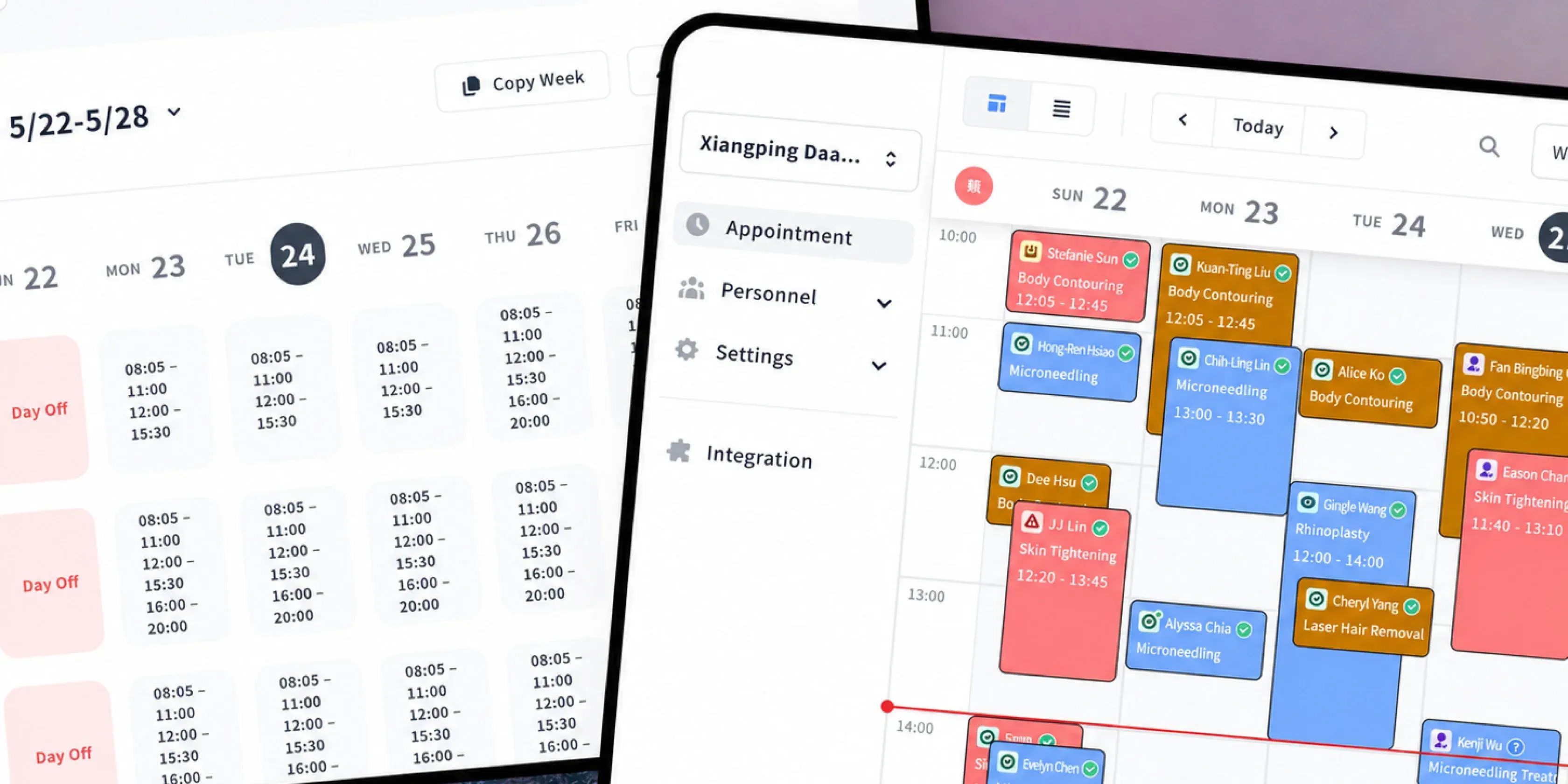
Appointment overview calendar with services, staff and time slots arranged across the day
Appointment overview interface showing the clinic’s daily work of arranging services, staff, and time slots through a calendar.

2InsightAppointment scheduling is actually resource coordination

When we reframed the problem from “how patients book” to “how clinics decide whether a time slot can be booked,” the complexity behind appointment scheduling became clearer.

From interviews with aesthetic medicine, dermatology, rehabilitation, and other clinics, we saw three common patterns:

  1. Booking entry points are not fixed: Some clinics want patients to choose a service / treatment first, some want them to choose a doctor / therapist first, and some prioritize available dates and time slots. This means the booking flow cannot be designed as a single path.
  2. Online booking needs clinic-side control: Clinics do not necessarily want to make every service, every staff member, or every time slot available to patients. Before opening online booking, the clinic side needs to set up services / treatments, staff, schedules, and booking flows. This means the simple patient-facing flow must be built on clinic-manageable rules.
  3. The system should support management, not replace on-site judgment: Service duration, acceptable booking capacity, staff and equipment, schedules, and reminders all affect how appointments are arranged, but clinics still need necessary flexibility. The system should provide structure, not eliminate flexibility.

This insight clarified the design problem: self-pay booking is not one fixed flow. It is a resource-coordination logic that clinics need to configure, open, and manage.

Resource relationships between patients, treatments, staff, equipment, schedules and follow-up
Self-pay booking involves patients, treatments, staff, equipment, schedules, and follow-up across multiple resource decisions.

3Design challengeMake complex settings operable

To make the product truly usable for self-pay clinics, I needed to solve three design challenges:

  1. The flow could not serve only one specialty: Aesthetic medicine, dermatology, and rehabilitation clinics judge services / treatments, staff, and time slots in different orders. The system could not assume only one booking path.
  2. Settings could not be scattered across different places: Services / treatments, online booking restrictions, staff display settings, and online booking schedules all affect whether patients can complete booking. These settings needed to be organized into management entry points clinics could understand, rather than depending on front-desk staff to remember everything manually.
  3. The backend needed both efficiency and control: Online booking can reduce manual work, but clinics also need to decide which services are open, which staff are displayed, which time slots can be booked, and which scenarios still need human judgment.

4StrategyTurn scattered functions into a platform workflow

Four design strategies covering clinic-side settings, patient-facing booking, core workspaces and follow-up operations
Four design strategies for organizing clinic-side settings, patient-facing booking, core workspaces, and follow-up operations into one platform workflow.

I did not center the design direction on a single booking form. Instead, I returned to how clinics arrange a service process and organized four directions that could support platform extension. The first two were core architectures I participated in deeply early on; the latter two were directions I later helped the team extend and integrate as the product evolved:

  1. Redefine the calendar: Make the calendar not just a timetable, but the workspace where clinics arrange staff, equipment, services / treatments, and patients every day.
  2. Move settings upstream: Organize services / treatments, staff and equipment, and online booking schedules into backend settings so booking flows have clear rules.
  3. Preserve clinic control: Let clinics adjust online booking flows according to their operating model, such as whether patients choose services / treatments first or how they choose staff and time.
  4. Connect follow-up operations: Treat member data, reminders, tags, and case tracking as extensions of the booking workflow.

Together, these turn booking from “creating a time slot” into “managing a clinic service workflow.”

The four design directions joined into a single platform workflow
Four design directions: clinic-side settings, patient-facing booking, core workspaces, and follow-up operations, organized into one platform workflow.

5Solution 1Use appointment overview as the clinic’s daily workspace

The first design layer was placing “appointment overview” at the core of the backend.

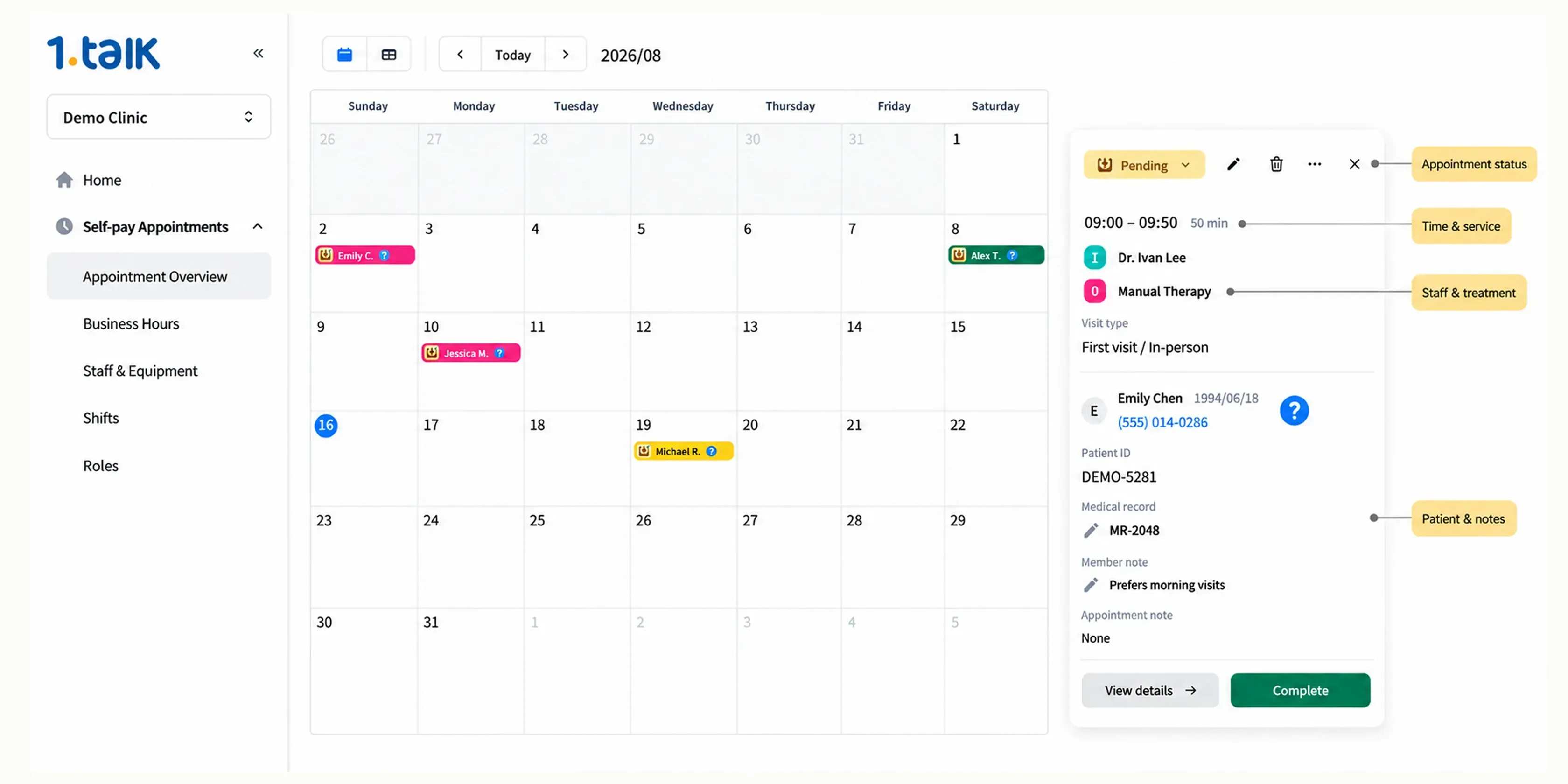
What clinics check every day is not a single patient profile, but: today’s appointments, which patient each appointment belongs to, who is responsible, what the current status is, and whether member information or follow-up reminders need to be reviewed. I designed the appointment calendar as the main workspace, allowing date, time slot, patient, service / treatment, staff, status, and notes to be viewed together.

The point was not to add more information to the screen, but to prevent front-desk staff from switching between tools to confirm details. Information that used to be scattered across paper, external calendars, messages, and member records was organized into one appointment context.

Creating an appointment from the calendar: date, member, staff and equipment, then confirmation
Appointment overview and appointment details: viewing time slots, patients, services / treatments, staff, and notes from the calendar.

6Solution 2Turn services, schedules, staff, and equipment into manageable settings

The second design layer was turning booking conditions that were originally scattered across staff experience into backend settings clinics could manage.

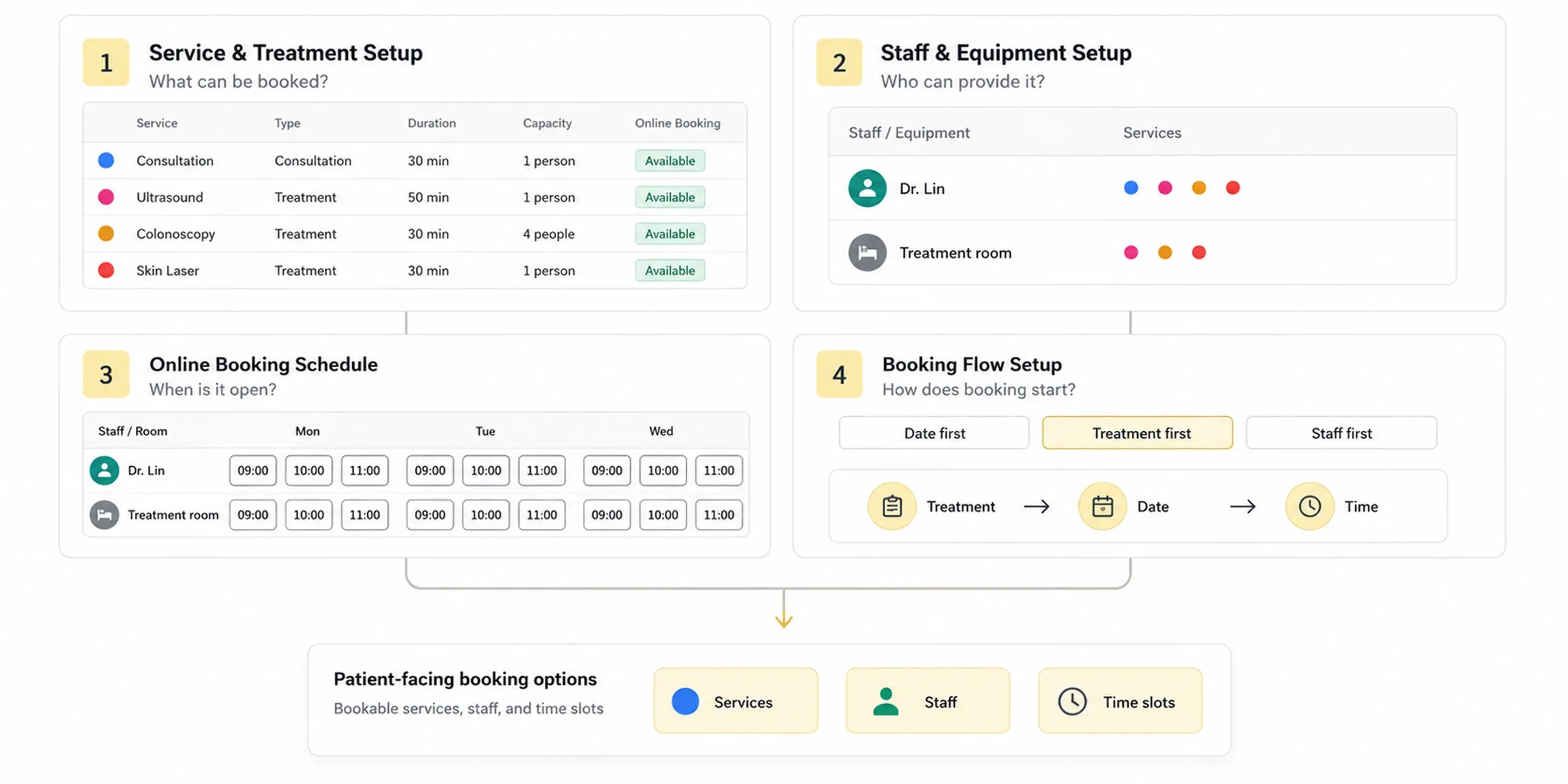
If appointment overview is the daily workspace, then services / treatments, staff and equipment, schedules, and online booking flows are the rule sources that make each appointment possible. Looking back, I understand this layer as four management entry points:

  1. Service / treatment settings: Clinics can create bookable services, set appointment duration, acceptable booking capacity, color labels, and whether a service is available for online booking.
  2. Staff and equipment settings: This was one of the core areas I participated in directly early on. Self-pay booking may involve not only doctors, but also therapists, rooms, equipment, or other resources, so the backend needs to define which staff and equipment participate in the booking flow.
  3. Online booking schedule settings: The team later extended this architecture into more detailed online bookable time-slot settings, allowing clinics to control the actual availability patients can see.
  4. Online booking flow adjustment: The team also added patient-facing booking-flow settings, allowing clinics to decide whether patients choose a service / treatment, staff, or date and time first based on how they operate.

As a result, booking was no longer only placing time on a calendar. Clinics first define which services can be booked, which staff or equipment can handle them, and which time slots should be open to patients.

This layer was not completed all at once. Early on, my deepest direct involvement was in the appointment scheduling workspace and the foundational architecture for how staff and equipment enter the booking flow. As the product expanded, the team gradually added service / treatment settings, online booking schedules, and booking-flow adjustments based on different clinic and online booking needs. My role also shifted from directly designing core flows to design leadership, helping the team extend later features back into the same platform logic.

Exception states across services, staff and equipment, online booking schedules and booking-flow settings
Services / treatments, staff and equipment, online booking schedules, and booking-flow settings together determine the services, staff, and time slots patients can book.

7Solution 3Translate clinic-side settings into patient-bookable flows

If the previous layer established rules on the clinic side, the third design layer handled how those rules are translated into patient-facing booking flows that are understandable and selectable.

In the past, it was easy to imagine booking as “if the clinic has a schedule, patients can select a time.” But actual product settings and online booking flows showed that a complete clinic-side schedule does not necessarily equal the time slots patients can see. Clinics need to decide which options appear on the patient side according to services / treatments, staff, schedules, intervals, and opening rules.

So the design supported online booking-flow settings, allowing clinics to adjust the patient-facing booking order based on their operating model:

  • Date-first: Patients first see available dates and time slots.
  • Service / treatment-first: Patients select a service first, then see available times for that service.
  • Staff-first: Patients select staff first, then continue to services and time slots.

This structure preserves clinic control. Clinics can have a complete schedule but only open part of it to online booking; they can also show different bookable times based on service / treatment or staff. For patients, the flow is simplified into selectable options. For clinics, the flexibility of schedules, services, and staff settings remains behind the scenes.

Clinic-side settings translated through bookable rules into the options patients see
How clinic-side settings are translated through bookable rules into the services, staff, and time-slot options patients actually see.

8ScalingFrom PinMed Suite into 1.Talk

The first three solutions explain how the early booking-platform logic was established. This scaling section returns to another question: when the product gradually moved from PinMed Suite — focused on self-pay — into 1.Talk, a cross-specialty doctor-patient relationship management platform, how was this logic preserved, reorganized, and extended by the team?

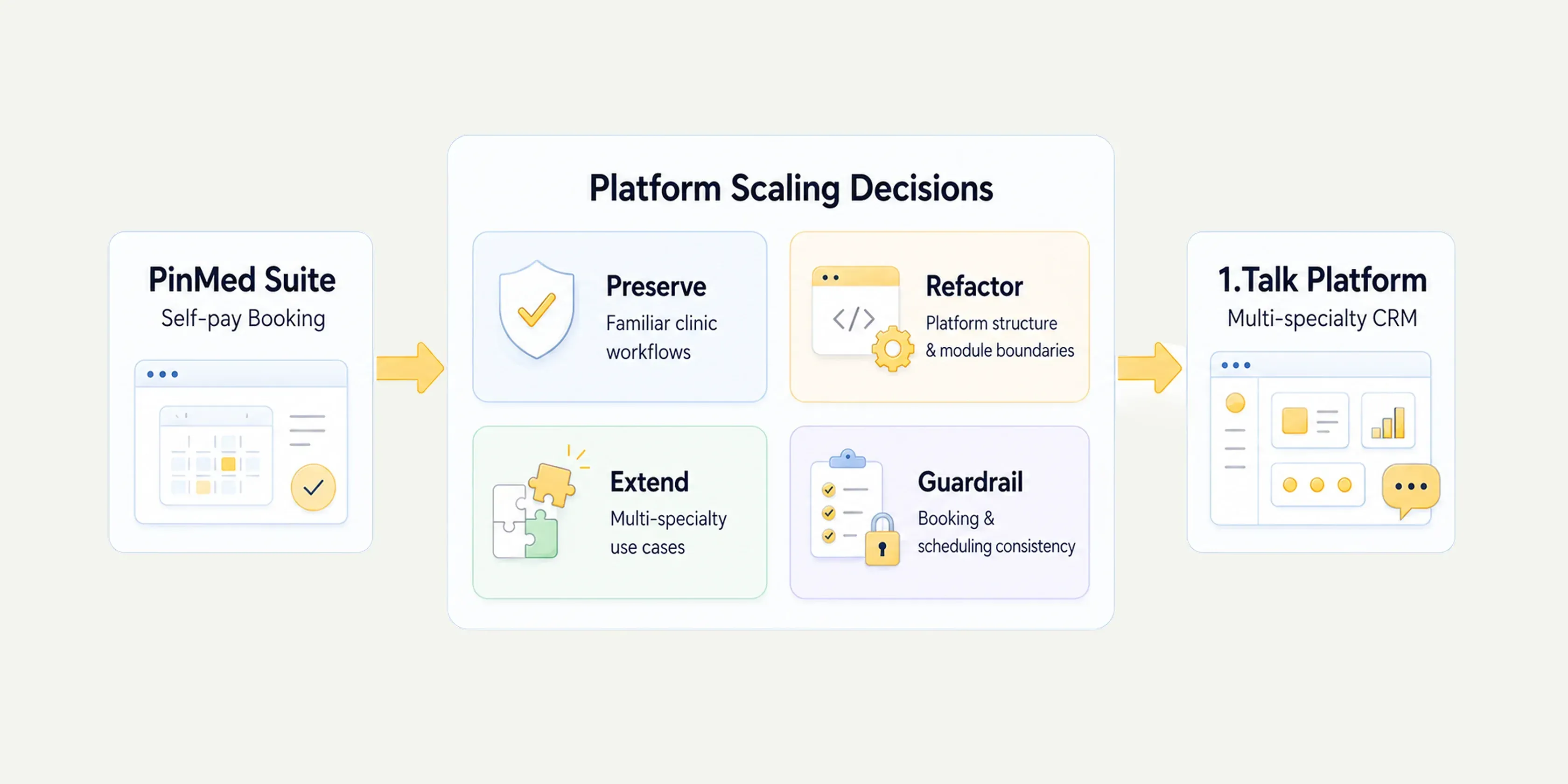
At this stage, my role also shifted from individual product designer to design lead. The design challenge was no longer only completing one feature, but making platform-integration judgments: which early usage habits should be preserved, which architecture needed reorganization, which features could be extended by different designers, and which appointment, staff-equipment, and schedule logic had to remain consistent.

For existing users, stability, predictability, and low learning cost can matter more than a completely new interface. During integration, we prioritized preserving familiar clinic operating logic, then adjusted information architecture and module boundaries for the new 1.Talk architecture. My work changed from “designing a single flow completely” to helping the team judge whether each later feature still connected back to the original appointment workspace, resource relationships, and online booking rules.

Design-lead decisions during platform integration: preserve workflows, reorganize architecture, extend scenarios, keep logic consistent
Design-lead decisions during platform integration: preserving existing workflows, reorganizing architecture, extending platform scenarios, and maintaining consistency in appointment and schedule logic.

After the product entered the Japanese market, design judgment also expanded beyond feature migration into language, timezone, typography, character visuals, and healthcare communication habits. Those localization issues are not the focus of this case, so I only reference them here as part of the platform expansion. A more complete discussion of Japan-market and cultural design thinking is in Localization, Below the Surface.

Later, 1.Talk was also positioned as an appointment and scheduling management tool that can support all clinic specialties, managing both National Health Insurance-style queue registration and self-pay time-slot booking in one place. This also validated the early decision to bring staff, equipment, treatment duration, and schedules into the calendar workspace. It was not only adding features for aesthetic-medicine scenarios, but building an extensible platform foundation. To me, the later design-lead role was about helping the team continuously connect new requirements back to that foundation as features and markets expanded.

9OutcomeFrom self-pay booking tool to clinic operations platform

This booking and operations capability later became part of the 1.Talk platform, supporting expansion to more than 2,000 clinics across Taiwan and Japan. 1.Talk has sent more than 44 million appointment reminder messages, reached 5.5 million people, and received the 2024 GOOD DESIGN AWARD in Japan and the 2025 Golden Pin Design Award.

Internally, through Design with Data, we also turned “appointment scheduling” and “member management” from feature modules into observable core behaviors, such as monthly usage count, most recent usage time, time required to create a new appointment, DAU / MAU, and 7-day / 30-day retention. These metrics were not only for showing outcomes; they helped the team judge which functions clinics continued using, which flows created operational cost, and which designs needed simplification or adjustment.

More importantly, this project helped the team establish an extensible clinic-backend design method: start from the core workspace and staff / equipment architecture to understand how clinics arrange appointments; organize services, schedules, staff / equipment, and flow options into manageable settings; then use data to verify whether functions truly enter daily workflows.

10ReflectionReframing the design logic of a platform

This project taught me that B2B healthcare product design is not only about efficiency, but about trust, controllability, and extensibility.

1. Backend design should make rules operable

Clinics rely on many on-site judgments. Design should not hide this complexity or let the system replace all judgment. It should turn known service, schedule, and staff / equipment conditions into maintainable settings while leaving necessary flexibility for the site.

2. Control matters more than full automation

Online booking does not mean everything should be opened for patients to operate. For clinics, knowing what can be opened and what needs human judgment is the precondition for using the system.

3. Platformization is not more features, but a foundation that supports more scenarios

From PinMed Suite to 1.Talk, I came to understand the design responsibility behind product scaling: early designers need to establish a stable enough core architecture, while later design leads need to help the team judge which features can extend, which experiences should be preserved, and whether details handled by different designers still return to the same product logic.

All internal materials are anonymized and shown from demo environments; no patient or client data is disclosed.