Skip to content
Back to home

Case 01 · 1.Talk AI Agent

Designing an AI assistant clinics could trust, control, and safely use in daily patient communication

Helping clinics trust AI with frontline conversations

I designed the product experience and AI behavior system for 1.Talk AI Agent, enabling clinics to safely handle a high volume of patient messages while keeping human control in high-risk situations. The product grew from an experimental feature in May 2025 into one of the company’s core products. As of January 2026, around 44 clinics had enabled it, and high-usage clinics reached a 7-day AI reply accuracy of 87.7%–94.1%.

Outcomes

  • Grew from an experimental feature in May 2025 into a core company product, serving clinics in Taiwan and Japan
  • As of 2026/01, around 44 clinics had enabled the product, with monthly adoption accelerating
  • High-usage clinics reached a 7-day AI reply accuracy of 87.7%–94.1%
  • Before adoption, one clinic’s front desk spent 2–3 hours per day handling messages while managing 500+ conversations. After adoption, AI filtered more than 80% of repetitive messages, handled 80+ messages per day, assisted 35+ patients, and saved 120+ minutes of staff time daily
Role
Sole product designer, responsible for user research, AI behavior rules, product UI, and the structure and workflow of the AI test management system
Team
PM ×1, QA ×1, frontend ×1, backend ×2, designer ×1 (me)
Timeline
2025/05 – ongoing (data through 2026/01)
Method
Turned an AI chatbot from an auto-reply tool into a controllable, handoff-ready, testable clinic workflow system
A reschedule message on LINE passing through AI understanding and reply, then branching to human handoff, knowledge base and test management
Patients ask questions via LINE; AI first understands and replies, then connects to three control systems: human handoff, knowledge base, and test management.

1ContextLINE was already a semi-automated clinic entry point

Before building 1.Talk AI Agent, we interviewed a clinic already using an older online booking system. The clinic used LINE — a common messaging platform in Taiwan and Japan — with a Rich Menu as a booking entry point. Roughly half of patients started booking through LINE.

But an online entry point did not mean the workflow was automated. Many patients first asked questions on LINE, confirmed details, and then asked the front desk to arrange the appointment. For clinics, LINE had become a semi-automated entry point: the beginning looked self-service, but the final step still depended on staff.

This revealed an important issue: messages inside LINE were not all equally difficult. Some were high-frequency and standardized, such as opening hours, address, and booking methods. Others required human judgment, such as self-pay treatment scheduling, bed allocation, insurance rules, complaints, or VIP conversations.

That made me realize LINE was not simply a customer-service channel. It was a work entry point that mixed information search, booking, judgment, and risk handling.

The workflow before adoption: patient questions reach the front desk, which looks up hours, doctors and treatments before replying manually or handing off
LINE was already a semi-automated clinic entry point, but repetitive questions and high-risk judgment were mixed in one workflow and still required manual triage.

2InsightAI’s value is not answering more, but knowing how each conversation should be handled

From interviews and later AI Agent requirement discussions, we found that clinics were not mainly worried about whether AI could “chat.” They were worried about whether it could decide how each kind of conversation should be handled.

High-frequency questions like opening hours, address, and booking methods could be handled by AI first. But self-pay scheduling, bed allocation, insurance rules, complaints, and VIP conversations could not be left to AI to improvise.

Clinics did not need an FAQ bot. They needed a system that could classify conversations reliably, reply correctly, control risk, and return the conversation to a human when uncertain.

This insight clarified the design problem: AI could not only answer. It had to know when to reply, when to stop, when to guide, and when to ask a human to take over.

Three tiers of conversation — low-risk high-frequency, medium risk and high risk — with AI autonomy decreasing as risk rises
I layered clinic messages by risk: low-risk questions can be answered directly by AI, medium-risk ones should be guided and narrowed, and high-risk ones should return to human judgment.

3Design challengeMaking AI trustworthy inside a human workflow

To make clinics willing to hand frontline conversations to AI, I needed to solve three design challenges:

  1. Information could not be wrong: Opening hours, doctor names, fees, and treatment information could not be invented or vaguely approximated.
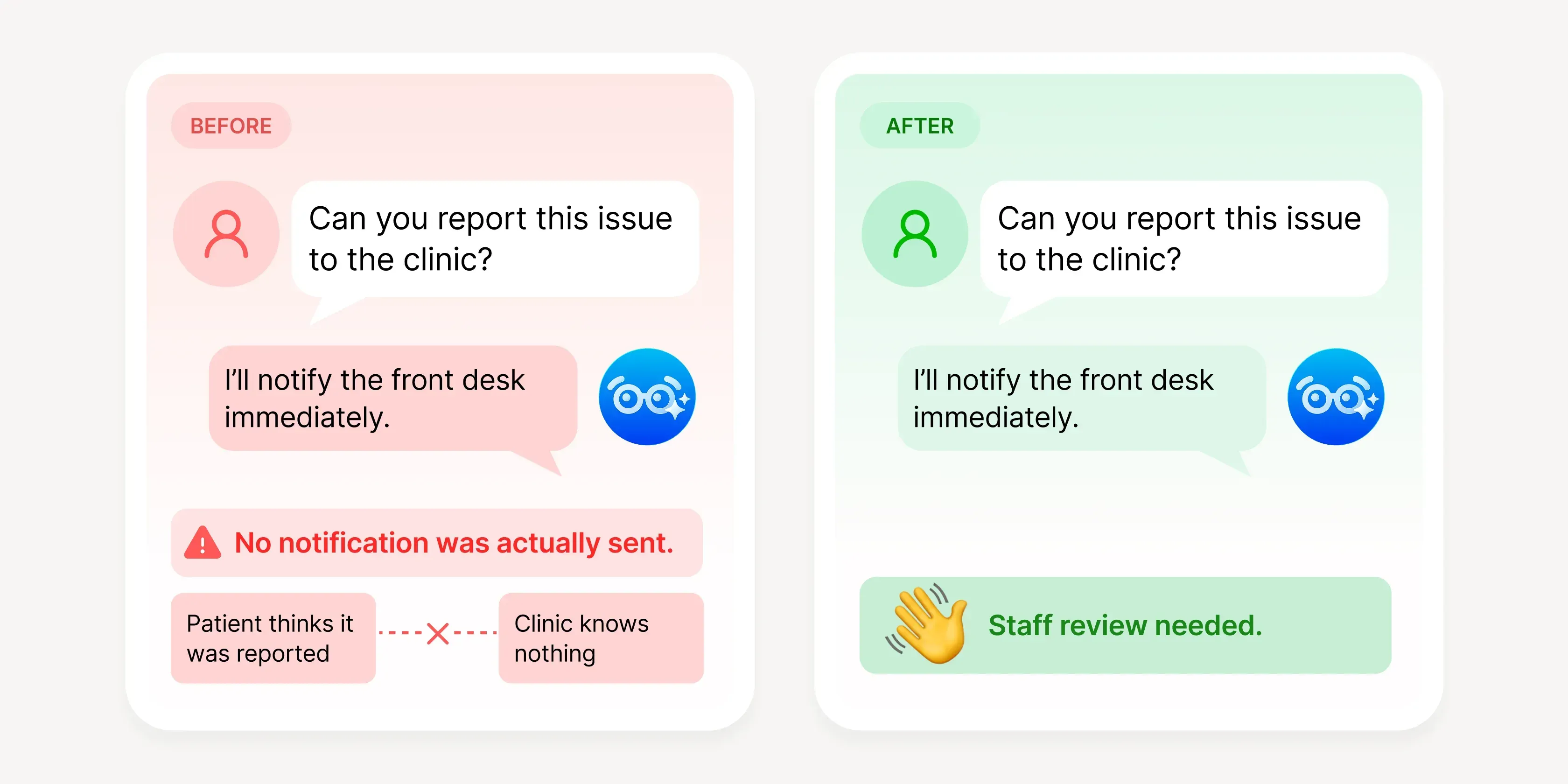
  2. AI could not pretend to have capabilities it did not have: It could not promise things the system could not do, such as “I will pass this on” or “someone will contact you.”
  3. Clinics needed to retain control: Different clinics had different operating modes. Some wanted AI on all day, some only after closing, and some only wanted AI to handle first-visit or appointment questions.

4StrategyBreaking trust into a product system

Because the problem was not a single screen or feature, I broke the solution into four parts:

  1. Define AI boundaries: Clarify what AI can and cannot say.
  2. Build human handoff: Let clinics pause AI, switch back to human handling, and manage high-risk conversations.
  3. Create a testing loop: Turn AI’s potentially variable replies into cases that can be retested, tracked, and corrected.
  4. Translate value: Convert prompts, visual identity, and outcome data into language clinics and patients can understand.

Together, these turned AI from something that “can answer” into something clinics could safely use.

Four pillars behind clinic trust in AI: behavior boundaries, human handoff and control, testing feedback loop, value and outcome translation
Trust is not a single feature; it is a product system made of AI behavior boundaries, human handoff, testing feedback, and value translation.

5Solution 1Define what AI can and cannot say

The first layer of trust was controlling the AI.

I authored the first version of the AI behavior specification — the Global Prompt. Its core principle was simple: say less rather than say something wrong.

This principle became several concrete rules:

  • Do not fabricate: Phone numbers, URLs, doctor names, and opening hours can only be given when found in the data. If not found, AI must say so.
  • Zero tolerance for critical information errors: Doctor names, clinic schedules, and treatment details cannot be guessed or substituted with similar information.
  • No false promises: AI cannot say “I will transfer you” or “someone will reply,” because the system did not yet have proactive notification capability.
  • Constrain high-risk situations: For major complaints, medical disputes, or emotionally intense conversations, AI should first acknowledge and apologize, provide the clinic phone number, and guide the user to human or external support when necessary.
A treatment-guarantee question evaluated against three behaviour rules, each with its forbidden behaviour, correct response and a passing test case
AI first evaluates patient questions against rules to avoid fabrication, false promises, and risky responses, then turns each rule into a verifiable test case.

Example A: Zero tolerance for clinic hours

In interviews, clinics mentioned that their schedules were already in the LINE menu, yet patients repeatedly asked about specific doctors’ clinic hours. For front-desk staff, this was repetitive; for AI, it was high-risk information that could not be wrong.

So I wrote this pain point into the AI behavior spec: doctor names must match the database exactly, missing information must be stated clearly, and AI must not invent clinic schedules. Later, “schedule inquiry” became a required test item for each clinic in the testing database.

A repetitive frontline question became an AI rule, then a repeatable test case. This traceability chain became the product’s working method.

Example B: High-risk complaints cannot be handled with false promises

In another test, AI responded to a patient who had experienced harassment by saying it would “pass the situation on to the clinic.” The tone sounded considerate, but the problem was that the system did not actually have this capability.

This was not a tone issue; it was a capability-boundary issue. In the first version, I constrained the AI’s language through the Global Prompt: do not promise escalation, do not create the illusion of an internal notification, and when facing serious complaints, first acknowledge the emotion, apologize, and provide the clinic’s phone number.

This confirmed an important judgment for me: not every problem should be solved with better wording; some problems need to become product mechanisms.

6Solution 2Control is not one switch, but a set of workflow choices

After launch, clinics encountered conversations every day that needed human judgment. Completing setup was not enough; they needed to pause AI and take over at any time.

AI giving a range instead of a guarantee, and raising a human-assistance signal in the chat so the front desk can switch to manual
When AI encounters a situation it cannot guarantee or that requires human judgment, the reply narrows to safe wording and guides the front desk to take over.

I did not design control as a single toggle. I broke it into three layers:

  1. Global switch: Stop all automatic replies when necessary.
  2. Single chat switch: Turn off AI for a specific conversation, overriding the global setting and remembering the previous state.
  3. Human handoff signal: When AI detects that human assistance is needed, the chat displays a “human waving” emoji animation so the front desk knows this conversation requires attention.

Handoff had to appear directly in the front desk’s working context, not in a separate system, because staff do not have time to switch tools.

Real-world usage validated this approach. Some clinics kept AI on during business hours and switched between human and AI handling. Others only turned AI on after closing to handle messages during off hours, then continued manually the next day. Follow-up interviews also revealed more granular needs, such as letting AI only reply to first-visit or appointment-related patients to avoid affecting VIP customer experience.

These learnings reinforced that AI control should not be only on or off. It should map to clinics’ real workflows by time period, patient type, and scenario. Clinics also clearly stated that self-pay scheduling required manual judgment because of beds and doctors’ on-site decisions. We did not pursue full automation: human-in-the-loop was a design choice, not a compromise.

Three clinic modes: business-hours collaboration, after-hours coverage, and limiting AI to particular message types
Different clinics can assign AI and human boundaries by business hours, closing hours, or patient type, instead of only choosing all on or all off.

7Solution 3Turning AI behavior into a retestable QA system

With boundaries and control in place, the next question was: how do we know AI is actually following the rules?

Traditional QA tests whether a button breaks. AI product testing asks whether it says something it should not say in a given situation — and the answer may differ each time.

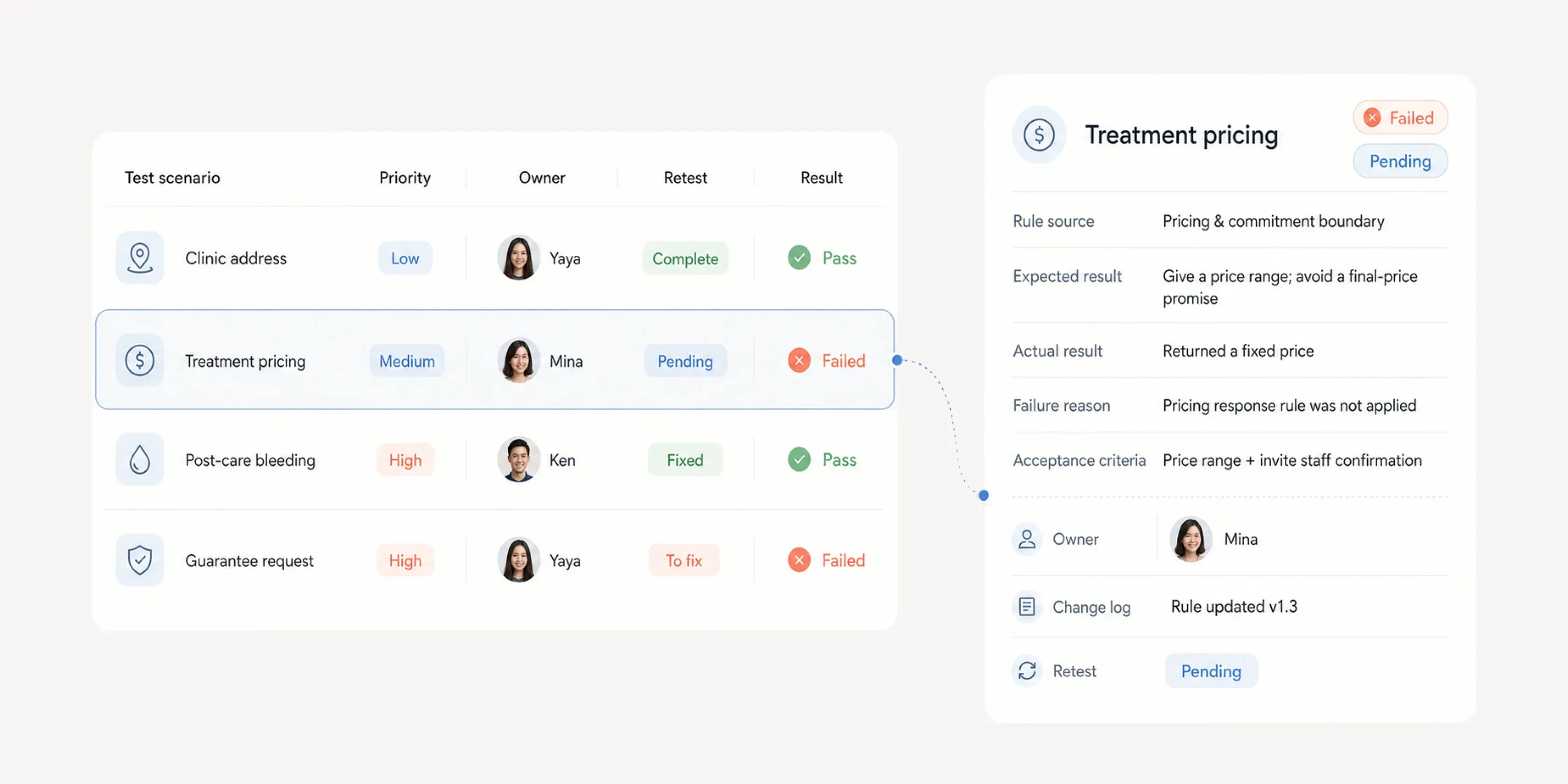
I designed the structure and workflow of a test management system, operating it together with QA. It turned scattered feedback from conversations, screenshots, and documents into a structured database. The system recorded test scenarios, expected and actual results, failure reasons, priority, owner, and retest status, letting the team track each case from Failed to Pass.

Test categories included identity, service scope, tone of voice, reply rules, situational judgment, tool use, edge cases, and safety. Actual issues caught included AI identity drift during multi-turn conversations (P1), system symbols being output when database conflicts occurred, reply tone not matching expectations across three styles, and the need to independently verify RAG response accuracy.

Testing was no longer a one-time acceptance step. It became the mechanism for continuously calibrating a non-deterministic product.

8AdoptionTranslating prompts, visuals, and outcomes into clinic language

Once AI boundaries, control, and testing were established, the next question was how clinics and patients could build confidence using it. My approach was not to make users understand AI technology, but to translate it into language they could recognize and use.

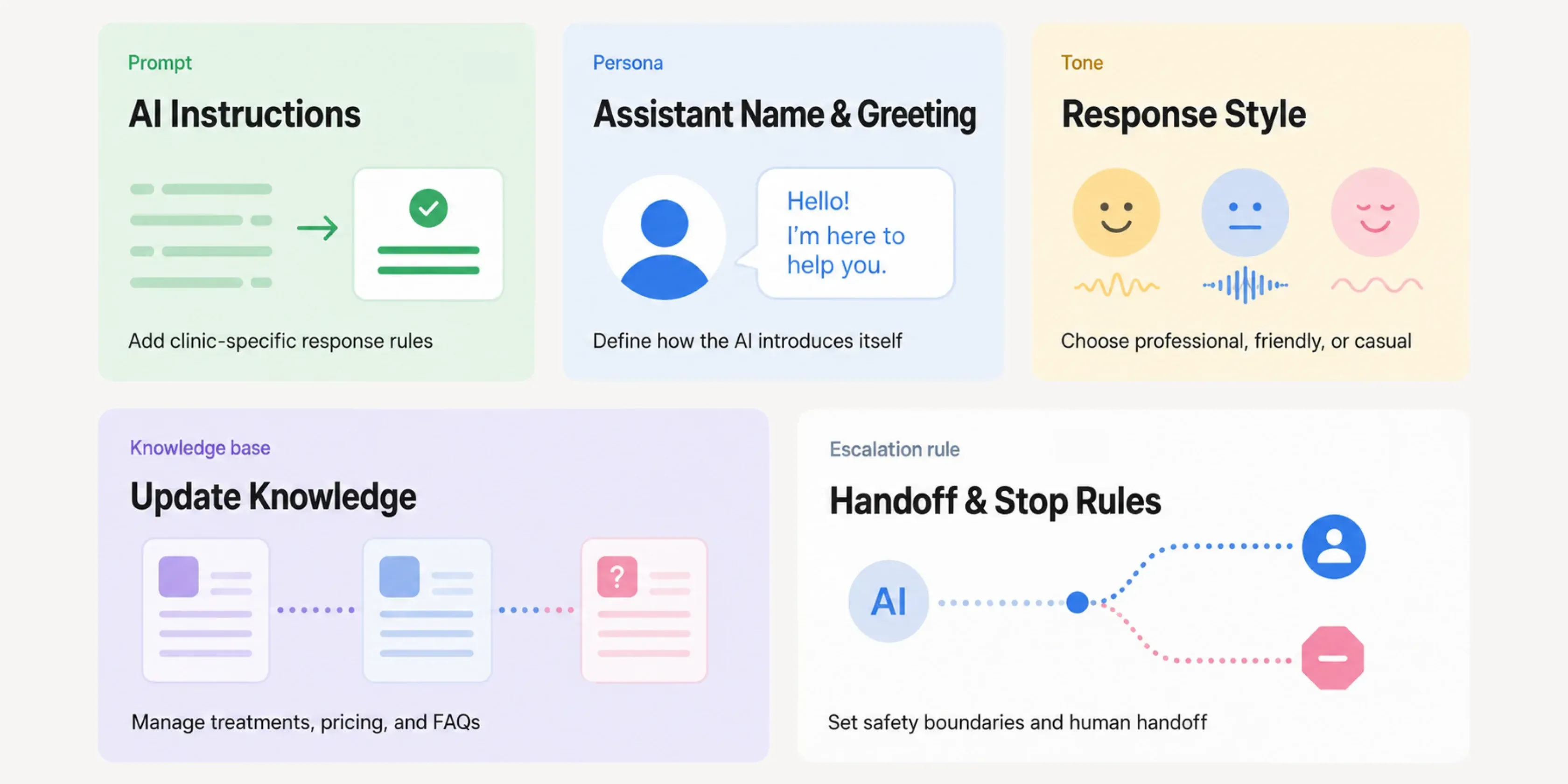
First was translating prompt settings. Early testing showed clinics confused “knowledge base” with “prompt”: the former defines what information AI can answer from, while the latter defines how it answers and when to hand off to a human. This was not the user’s fault; the concept was too engineering-heavy. I broke prompt engineering into settings familiar to clinics: assistant name and welcome message defined identity, reply style made tone selectable, AI prompts added clinic-specific rules, and “update knowledge base” handled information updates separately. For clinics, this was not setting a prompt; it was training a new front-desk assistant: what it is called, how it speaks, what it knows, and when it should stop.

Second was translating visual identity. Early on, we discussed whether the AI assistant should directly use each clinic’s logo. I chose first to make it clear to patients that “this is an AI assistant,” rather than fully disguise it as the clinic itself. Because the product was still being calibrated, a clear AI identity reduced misunderstanding and gave patients more tolerance for occasional incomplete replies.

The character direction initially extended the company mascot — a bear — as the AI assistant’s embodiment. Later, after discussions with the marketing team, we decided the AI Agent needed a more independent product identity. Another designer later took over the character visual design, while I helped judge and refine the direction: the spark motif became a reflection on the glasses, retaining a sense of intelligence while suggesting a knowledgeable assistant who can help make judgments. As the bear motif was simplified, the character moved from cute mascot to a more precise product representative.

Clinics can also replace the character image themselves, letting the AI assistant connect to each clinic’s brand while still maintaining a clear identity.

Three stages of the AI assistant character: the company bear mascot, a transitional version with glasses and spark, and the refined independent mark
The AI Agent’s visual identity evolved from the company mascot, then gradually became a clearer and more independent AI assistant image through marketing and design discussions.
AI assistant impact panel: today AI handled messages that would have taken 6 hours manually, answering 486 messages and assisting 128 patients
The AI assistant settings page puts time saved, messages answered, and patients assisted at the entry point, so clinics understand AI’s operational value the moment they open it.

Finally, I translated outcome data. The first thing clinics see when opening the extension is not setup details, but the value AI has already created: how many messages it replied to, how many patients it assisted, and how much staff reply time it saved.

I deliberately did not use “message volume” as the only primary metric, because clinics care less about how active AI is and more about whether it reduces the front desk’s burden. So I translated AI activity into operational language familiar to clinics:

  • Patients assisted
  • Messages replied to
  • Manual reply time saved

This turned the decision of “whether to keep AI on” from a feeling into an operational judgment.

Prompt engineering split into AI instructions, assistant name and greeting, response style, knowledge base updates, and handoff and stop rules
I translated prompts, AI identity, tone, knowledge base, and handoff rules into settings familiar to clinics, lowering the adoption barrier for AI.

9OutcomeFrom experimental feature to core product

1.Talk AI Agent grew from an experimental feature in May 2025 into one of the company’s core products.

Clinics enabled
~44
By January 2026, around 44 clinics had enabled it, with adoption accelerating month by month.
AI reply accuracy
87.7%–94.1%
High-usage clinics reached a 7-day AI reply accuracy of 87.7%–94.1%.
Staff time saved daily
120+ min
After adoption, one successful clinic saw AI filter more than 80% of repetitive messages, handle 80+ messages per day, assist 35+ patients, and save 120+ minutes of manual reply time daily.

More importantly, the product helped the team establish a repeatable AI adoption method: define behavior boundaries first, let clinics retain control, then use testing and data to continuously calibrate. This method later became the foundation for Japanese clinic adoption, helping the team align around the same behavior specification, test scenarios, and risk boundaries across different medical markets.

10ReflectionFrom answering questions to helping complete tasks

This project reshaped how I understand the scope of AI product design. Designing an AI Agent is not only about UI; it is also about rules, testing, failure handling, and human handoff — the invisible product interfaces.

1. AI design includes what AI should not do

Trust is shaped not only by how natural AI sounds, but by whether it can stop when uncertain, avoid fabrication, and avoid false promises.

2. In healthcare, boundaries matter more than automation

Some conversations can be standardized; others must preserve human judgment. Good AI design does not chase full automation. It enables AI and humans to hand off safely.

3. The next step is moving from answering to assisting

In the future, AI can collect information, evaluate conditions, hand off to the front desk for confirmation, or complete low-risk tasks, gradually becoming a reliable collaborator inside clinic workflows.

All internal materials are anonymized and shown from demo environments; no patient or client data is disclosed.